也是一篇 long overdue,拖到跨年了。本来是打算在给老笔记本装系统的时候顺手把一些东西记下来做备忘,最后发现看到的有意思的东西越来越多,反倒是前面的系统安装是最无聊的一部分了。

缘起

之前因为工作用笔记本电脑是用 Debian,所以另一台放在宿舍日常用来影音的低配老旧笔记本也就很方便地装了 Debian。也不是没有考虑过 Arch Linux,但是试用了一下发现要 AUR 的东西真的太多了。首先 AUR 里很多软件更新频繁而编译需要时间不说,本身 AUR 里面的软件质量也很参差不齐。我碰到了问题也没有很懂 Arch 报 bug 是什么流程、AUR 是不是应该单独报。Debian 呢,跟我的工作用电脑保持一致也用了 Debian sid。为了发挥硬件最大价值,而且我也是影音使用多,所以在这台只有 Nvidia 独立显卡的电脑上装了天杀的闭源驱动。问题就在这里,无论是 Debian (sid) 还是 Arch (stable),只要用上 Nvidia 闭源驱动,电脑在睡眠唤醒之后很大几率出现屏幕无法唤醒,特别是在有外接显示器情况下。我检查了日志也没有发现问题所在,很无奈。无意在网上看到才知道 FreeBSD 也 port 了 Nvidia 的闭源驱动。出于对于 Unix/BSD 的好奇和对以往听说的 BSD 高质量的传说,我打算折腾着装一个 BSD 试试看。在 FreeBSD、NetBSD 和 OpenBSD(当然是按首字母排序没有其他意思)三个之间毫无意外选了 FreeBSD。另外 GhostBSDDragonflyBSDMidnightBSDNomadBSD 等等都是不错的 BSD 系统,但是考虑到用户特别是桌面用户数量,还有和 Wiki 和文档数量和质量,当然对于我这种刚接触 Unix 的人来说还是不要选小众的。

安装 FreeBSD 系统

开始当然要在虚拟机里试试系统安装,确实比常见的 Linux 现在都有安装器难一些。但是如果不想要很多自定义设置,全程都接受默认的话很简单就能装好系统。

然而,我肯定不可能全程默认啊那和咸鱼有什么分别!我的笔记本电脑由于太老,只能用 Legacy BIOS 根本不支持 UEFI。其次由于我习惯还是保留一个 Windows 系统备用(没办法,有时候就是要用一下 Office 或者 EndNote)所以一直是单硬盘双系统。最后一点完全出于好奇,我打算用一下被无数人安利的据说很强大的 ZFS 并且想要自己调整分区方案和分区大小。最开始我没料到同时满足上面这三点这么难,不然我可能不会尝试或者妥协放弃其中某个想法。

最难的是双系统安装。由于是单硬盘,所以无论是 Windows 还是 FreeBSD 最终都只会占据单块硬盘上的某个分区。在 Windows 系统术语里, 分区有主分区和扩展分区,主分区最多 4 个,其中最多一个主分区可以作为扩展分区再划分出一个或者多个逻辑分区。在 Linux 语境下上述分区体系基本上没什么冲突。由于主分区最多 4 个,所以逻辑分区一般在 Linux 下从 5 开始编号,比如 sda5 表示逻辑分区里的第一个分区。哪怕是只有一个主分区和一个只包含一个逻辑分区的扩展分区同样会被编号为 5。Linux 可以装到逻辑分区也可以装到主分区。在 FreeBSD 里有个术语叫做 slice,有点像主分区和拓展分区的概念,一个 slice 里面可以划分出多个类似于逻辑分区的分区,这些逻辑分区可以用来装系统,而 slice 本身必须是一个主分区(就像是扩展分区)不能是一个逻辑分区。安装双系统的时候,FreeBSD 所在的 slice 必须是 Windows 下看到的主分区或者扩展分区,不可以是逻辑分区。

FreeBSD 使用 MBR 分区模式时,如果一块硬盘 ada0 有三个主分区,系统会依次编号为 ada0s1ada0s2ada0s3。在 UEFI 模式下为 ada0p1ada0p2ada0p3。这三个分区都是 slice。按照我的电脑的情况,前两个分区一个是 Windows 系统分区,一个是用来存东西的,二者都是 NTFS 格式。现在我就是要把 ada0s3 用来装 FreeBSD。如果我把 ada0s3 这个 slice 继续划分三个分区。系统会依次编号 ada0s3aada0s3bada0s3d。Wait, what???What happened to ada0s3c? Did you eat it? 当然不是….惯例上,FreeBSD编号时认为 a 分区用作 FreeBSD 系统分区,b 作为 swap 分区,c 则代表整个 slice,所以第三个分区会从 d 开始编号。FreeBSD 的文档里还有一张图也反映了这个情况:
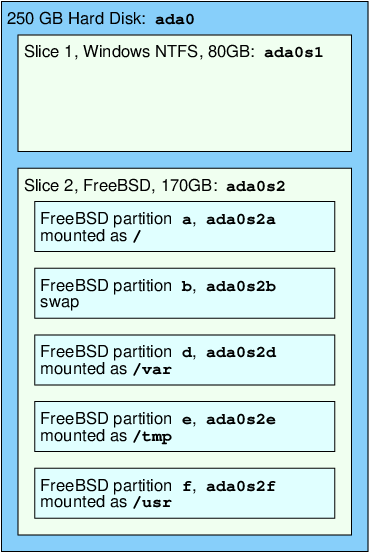
disk-layout

虽然说这是“惯例”不是硬性要求,但是还是建议按照这个来。不这样用可能会出一些奇奇怪怪的问题: I lost bootcode in BSD slice, a lot. Help me found out WHY?

搞清楚了基本概念,下面安装系统就不难了。步骤我写在 gist 上了:HowTo: [LegacyBIOS&MBR]Install FreeBSD RootOnZFS in a FreeBSD MBR Slice and Dual Boot Windows

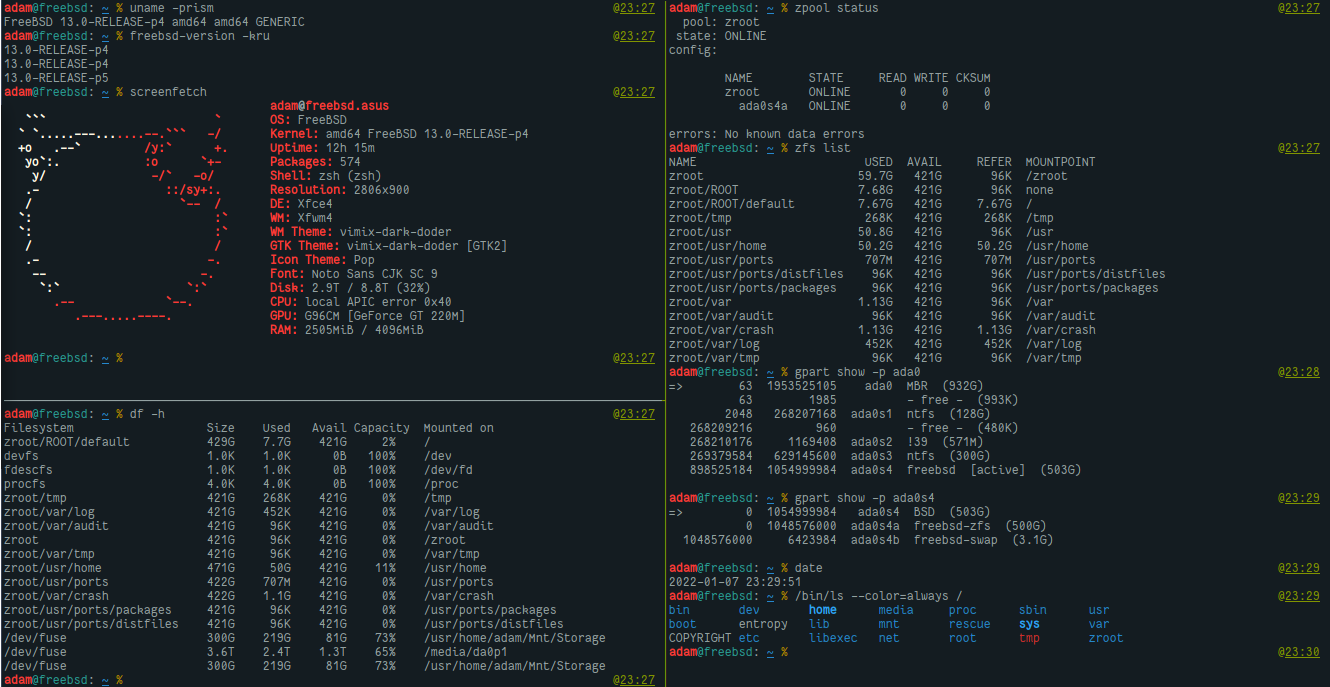
安装完基础系统重启之后确认网络没有问题,下一步就是安装 Xorg 和 DE 环境了。这一步如果用过 Gentoo 或者 Arch 就很熟悉了,确定合适的显卡驱动,安装驱动和 x11/xorg 之后确认 X 可以跑起来,再安装 DM 和 DE/WM 就好了。我的显卡是 Nvidia GeForce GT 220M/320M,查到 FreeBSD 的闭源驱动是 nvidia-driver-340-xx 驱动。之后就按照 Handbook 来搭建 DE 环境,我用的依然是 lightDM + Xfce4。全部装完弄好之后大概长这样(系统已经用了一阵子了不是最初的时候的截图):
freebsd.png

But what are BSDs anyway…

一些用到的 snipets

  • How to mount a zfs partition?

     1
     2
     3
     4
     5
     6
     7
     8
     9
    10
    11
    12
    13
    
    # run zpool import to get name of zpool (such as zroot)
    zpool import
    # create a mountpoint for zpool:
    mkdir -p /tmp/zroot
    # import zpool:
    zpool import -fR /tmp/zroot zroot
    # create a mountpoint for zfs /:
    mkdir /tmp/root
    # mount /:
    mount -t zfs zroot/ROOT/default /tmp/root
    # the directories will now be available in /tmp/root
    # export zpool:
    zpool export zroot
    
  • Enable core dumps:

     1
     2
     3
     4
     5
     6
     7
     8
     9
    10
    11
    
    mkdir -p /var/coredumps
    chmod 1777 /var/coredumps
    
    # /etc/sysctl.conf
    kern.coredump=1
    kern.corefile=/var/coredumps/%U/%N.core
    kern.sugid_coredump=1
    or:
    sysctl kern.coredump=1
    sysctl kern.corefile=/var/coredumps/%U/%N.core
    sysctl kern.sugid_coredump=1
    
  • Set screen birghtness from command line:

    1
    2
    
    # check hw.acpi.video first
    sudo sysctl hw.acpi.video.lcd0.brightness=15  
    
  • 笔记本合盖睡眠模式:

    1
    
    sudo sysctl hw.acpi.lid_switch_state=S3
    
  • Check video driver GLX info:

    1
    
    glxinfo | grep vendor
    
  • Useful stuff in /etc/rc.conf:

     1
     2
     3
     4
     5
     6
     7
     8
     9
    10
    11
    12
    13
    14
    15
    16
    17
    18
    19
    20
    21
    22
    23
    24
    25
    26
    27
    28
    29
    30
    31
    32
    
    zfs_enable="YES"
    gptboot_enable="NO"
    kld_list="nvidia fusefs acpi_asus acpi_asus_wmi acpi_video"
    hostname="freebsd.asus"
    rc_startmsgs="NO"
    
    sshd_enable="YES"
    moused_enable="YES"
    syslogd_flags="-ss"
    
    background_dhclient="YES"
    wlans_ath0="wlan0"
    ifconfig_wlan0="WPA SYNCDHCP"
    dbus_enable="YES"
    
    dumpdev="AUTO"
    clear_tmp_enable="YES"
    clear_tmp_X="YES"
    
    sendmail_enable="NO"
    sendmail_submit_enable="NO"
    sendmail_outbound_enable="NO"
    sendmail_msp_queue_enable="NO"
    
    # for VM
    #vboxguest_enable="YES"
    #vboxservice_enable="YES"
    #ntpd_enable="YES"
    #ntpdate_enable="YES"
    
    xdm_enable="NO"
    lightdm_enable="YES"
    

    And /boot/loader.conf:

    1
    2
    3
    4
    5
    6
    7
    8
    9
    
    zfs_load="YES"
    autoboot_delay="3"
    boot_mute="YES"
    verbose_loading="NO"
    # resolution of boot screen and tty, font size
    vbe_max_resolution="720p"
    screen.font="10x20"
    # Don't wait for USB during boot
    hw.usb.no_boot_wait=1
    

参考

其他值得一看的

*nix

Misc

One moRe thing

FreeBSD 二进制 pkg 源里有 math/R 可以直接安装,但是默认编译没有链接 OpenBLAS。ports 里倒是可以自己自定义编译,但是我还没有搞懂 ports 怎么和 pkg 优雅且安全地一起使用。所以还是走老路自己编译吧。

FreeBSD 的 pkg 源是有 R 的,但是当我装好了之后发现(20211220 最新版 R 版本号是 4.1.2):

 1
 2
 3
 4
 5
 6
 7
 8
 9
10
11
12
13
14
15
16
> sessionInfo()
R version 4.1.2 (2021-11-01)
Platform: amd64-portbld-freebsd13.0 (64-bit)
Running under: FreeBSD freebsd.asus 13.0-RELEASE-p4 FreeBSD 13.0-RELEASE-p4 #0: Tue Aug 24 07:33:27 UTC 2021     root@amd64-builder.daemonology.net:/usr/obj/usr/src/amd64.amd64/sys/GENERIC  amd64

Matrix products: default
LAPACK: /usr/local/lib/R/lib/libRlapack.so.4.1.2

locale:
[1] en_US.UTF-8/en_US.UTF-8/en_US.UTF-8/C/en_US.UTF-8/en_US.UTF-8

attached base packages:
[1] stats     graphics  grDevices utils     datasets  methods   base     

loaded via a namespace (and not attached):
[1] compiler_4.1.2

是的,虽然我装了 OpenBLAS 但是 R 也不会调用。

准备过程就没什么好说的了,下载源码包解压,依赖该装的装。

先直接 configure 来碰碰运气:

1
configure: error: No Fortran compiler found

结果当然是毫不意外地报错了。第一反应当然是 Google 一下。在 FreeBSD 论坛看到这个 lgfortran not found 说其实就是系统装的 Fortran 编译器的可执行文件是带版本号的,比如我的系统是 /usr/local/bin/gfortran10,但是根据 R 的文档 R Installation and Administration: Using Fortran 可以看到编译过程中默认只会在 PATH 里找 gfortran,所以也就会报错了。知道问题所在那么就是用 Linux 很常见的办法了——建立软链接。但是这个方法显然没那么优雅,而文档里其实也提了,自己可以用 FC=FORTRAN 在编译时指定。根据我的情况那就是在 configure 的时候加上 FC=gfortran10 就好了。到这里我忽然灵机一动,以前看系统二进制编译参数的方法怎么忘了啊,那个里面就是这样指定的!好吧,不犟了,还是看看 pkg 二进制包怎么编译的吧。

FreeBSD 二进制包管理器 pkg 直接安装 math/R 之后查看 /usr/local/lib/R/etc/Makeconf:

 1
 2
 3
 4
 5
 6
 7
 8
 9
10
11
12
13
14
15
16
17
18
19
20
21
22
23
24
25
26
27
28
29
configure  \
  '--disable-java' '--enable-R-shlib' \
  '--with-readline' 'rdocdir=/usr/local/share/doc/R' \
  '--with-cairo' '--with-ICU' \
  '--with-jpeglib' '--enable-long-double' \
  '--disable-memory-profiling' '--enable-openmp' \
  '--with-libpng' \
  '--enable-BLAS-shlib' '--without-blas' '--without-lapack' \
  '--enable-R-profiling' \
  '--with-tcltk' '--with-libtiff' \
  '--with-x' '--x-libraries=/usr/local/lib' \
  '--x-includes=/usr/local/include' \
  '--prefix=/usr/local' \
  '--localstatedir=/var' \
  '--mandir=/usr/local/man' \
  '--infodir=/usr/local/share/info/' \
  '--build=amd64-portbld-freebsd13.0' \
  'build_alias=amd64-portbld-freebsd13.0' \
  'MAKE=gmake' 'PKG_CONFIG=pkgconf' \
  'CC=cc' \
  'CFLAGS=-O2 -pipe  -DLIBICONV_PLUG -fstack-protector-strong -isystem /usr/local/include -fno-strict-aliasing ' \
  'LDFLAGS= -L/usr/local/lib -Wl,-rpath=/usr/local/lib/gcc10  -L/usr/local/lib/gcc10 -B/usr/local/bin -fstack-protector-strong '\
  'LIBS=-L/usr/local/lib' \
  'CPPFLAGS=-DLIBICONV_PLUG -I/usr/local/include -isystem /usr/local/include' \
  'CPP=cpp' \
  'FC=gfortran10' \
  'FCFLAGS=-Wl,-rpath=/usr/local/lib/gcc10' \
  'CXX=c++' \
  'CXXFLAGS=-O2 -pipe -DLIBICONV_PLUG -fstack-protector-strong -isystem /usr/local/include -fno-strict-aliasing  -DLIBICONV_PLUG -isystem /usr/local/include '

果然是 FC=gfortran10 指定 Fortran 编译器。还可以看到禁用了 BLAS 和 Java。

既然要作弊,干脆一不做二不休也参考一下 Debian 那边怎么编译的:

 1
 2
 3
 4
 5
 6
 7
 8
 9
10
11
12
13
14
15
16
17
18
19
20
21
22
23
24
25
26
27
28
29
30
31
configure \
 '--prefix=/usr' \
 '--with-cairo' '--with-jpeglib' \
 '--with-readline' '--with-tcltk' \
 '--with-system-bzlib' '--with-system-pcre' \
 '--with-system-zlib' \
 '--mandir=/usr/share/man' \
 '--infodir=/usr/share/info' \
 '--datadir=/usr/share/R/share' \
 '--includedir=/usr/share/R/include' \
 '--with-blas' '--with-lapack' \
 '--enable-long-double' '--enable-R-profiling' \
 '--enable-R-shlib' '--enable-memory-profiling' \
 '--without-recommended-packages' \
 '--build' 'x86_64-linux-gnu' \
 'build_alias=x86_64-linux-gnu' \
 'R_PRINTCMD=/usr/bin/lpr' \
 'R_PAPERSIZE=letter' \
 'TAR=/bin/tar' \
 'R_BROWSER=xdg-open' \
 'LIBnn=lib' \
 'JAVA_HOME=/usr/lib/jvm/default-java' \
 'R_SHELL=/bin/bash' \
 'CC=gcc -std=gnu99' \
 'CFLAGS=-g -O2 -ffile-prefix-map=/build/r-base-PT7Nxy/r-base-4.1.2=. -fstack-protector-strong -Wformat -Werror=format-security -Wdate-time -D_FORTIFY_SOURCE=2 -g' \
 'LDFLAGS=-Wl,-z,relro' \
 'CPPFLAGS=' \
 'FC=gfortran' \
 'FCFLAGS=-g -O2 -ffile-prefix-map=/build/r-base-PT7Nxy/r-base-4.1.2=. -fstack-protector-strong' \
 'CXX=g++' \
 'CXXFLAGS=-g -O2 -ffile-prefix-map=/build/r-base-PT7Nxy/r-base-4.1.2=. -fstack-protector-strong -Wformat -Werror=format-security -Wdate-time -D_FORTIFY_SOURCE=2 -g'

那我就来个东拼西凑,把我的编译参数改成:

 1
 2
 3
 4
 5
 6
 7
 8
 9
10
11
12
13
14
../configure '--prefix=/home/adam/Programs/R/4.1.2' \
  'FC=gfortran10' \
  'FCFLAGS=-g -O2 -fstack-protector-strong' \
  'CC=cc' 'CFLAGS=-O2 -pipe -fstack-protector-strong' \
  'CPP=cpp' 'CXX=c++' 'CXXFLAGS=-O2 -pipe -fstack-protector-strong' \
  --enable-R-shlib --with-blas --with-lapack \
  '--enable-long-double' '--enable-R-profiling' \
  '--enable-memory-profiling' '--without-recommended-packages' \
  '--build=amd64-portbld-freebsd13.0' \
  'build_alias=amd64-portbld-freebsd13.0' \
  'JAVA_HOME=/usr/local/openjdk8' \
  --with-tcltk \
  --with-tcl-config=/usr/local/lib/tcl8.6/tclConfig.sh \
  --with-tk-config=/usr/local/lib/tk8.6/tkConfig.sh

然后出乎意料一切 OK:

 1
 2
 3
 4
 5
 6
 7
 8
 9
10
11
12
13
14
15
16
17
18
19
20
21
22
23
24
25
26
27
28
29
R is now configured for x86_64-portbld-freebsd13.0

  Source directory:            ..
  Installation directory:      /home/adam/Programs/R/4.1.2

  C compiler:                  cc  -O2 -pipe -fstack-protector-strong
  Fortran fixed-form compiler: gfortran10 -fno-optimize-sibling-calls -g -O2 -fstack-protector-strong

  Default C++ compiler:        c++ -std=gnu++14  -O2 -pipe -fstack-protector-strong
  C++11 compiler:              c++ -std=gnu++11  -O2 -pipe -fstack-protector-strong
  C++14 compiler:              c++ -std=gnu++14  -O2 -pipe -fstack-protector-strong
  C++17 compiler:              c++ -std=gnu++17  -O2 -pipe -fstack-protector-strong
  C++20 compiler:              c++ -std=gnu++20  -O2 -pipe -fstack-protector-strong
  Fortran free-form compiler:  gfortran10 -fno-optimize-sibling-calls -g -O2 -fstack-protector-strong
  Obj-C compiler:              cc -g -O2 -fobjc-exceptions

  Interfaces supported:        X11, tcltk
  External libraries:          pcre2, readline, BLAS(OpenBLAS), LAPACK(in blas), curl
  Additional capabilities:     PNG, JPEG, TIFF, NLS, cairo, ICU
  Options enabled:             shared R library, R profiling, memory profiling

  Capabilities skipped:        
  Options not enabled:         shared BLAS

  Recommended packages:        no

configure: WARNING: you cannot build info or HTML versions of the R manuals
configure: WARNING: you cannot build PDF versions of the R manuals
configure: WARNING: you cannot build PDF versions of vignettes and help pages

最后我手痒优化一下编译参数,最终改成:

 1
 2
 3
 4
 5
 6
 7
 8
 9
10
11
12
13
14
15
16
17
../configure \
  '--prefix=/home/adam/Programs/R/4.1.2' \
  'FC=gfortran10' \
  'FCFLAGS=-march=native -mtune=native -g -O2 -fstack-protector-strong' \
  'CC=cc' \
  'CFLAGS=-march=native -mtune=native -O2 -pipe -DLIBICONV_PLUG -fstack-protector-strong' \
  'CPP=cpp' 'CXX=c++' \
  'CXXFLAGS=-march=native -mtune=native -O2 -pipe -DLIBICONV_PLUG -fstack-protector-strong' \
  --enable-R-shlib --with-blas --with-lapack \
  '--enable-long-double' '--enable-R-profiling' \
  '--enable-memory-profiling' '--with-recommended-packages' \
  '--build=amd64-portbld-freebsd13.0' \
  'build_alias=amd64-portbld-freebsd13.0' \
  'JAVA_HOME=/usr/local/openjdk8' \
  --with-tcltk \
  --with-tcl-config=/usr/local/lib/tcl8.6/tclConfig.sh \
  --with-tk-config=/usr/local/lib/tk8.6/tkConfig.sh

得到:

 1
 2
 3
 4
 5
 6
 7
 8
 9
10
11
12
13
14
15
16
17
18
19
20
21
22
23
24
25
26
27
28
29
R is now configured for x86_64-portbld-freebsd13.0

  Source directory:            ..
  Installation directory:      /home/adam/Programs/R/4.1.2

  C compiler:                  cc  -march=native -mtune=native -O2 -pipe -DLIBICONV_PLUG -fstack-protector-strong
  Fortran fixed-form compiler: gfortran10 -fno-optimize-sibling-calls -march=native -mtune=native -g -O2 -fstack-protector-strong

  Default C++ compiler:        c++ -std=gnu++14  -march=native -mtune=native -O2 -pipe -DLIBICONV_PLUG -fstack-protector-strong
  C++11 compiler:              c++ -std=gnu++11  -march=native -mtune=native -O2 -pipe -DLIBICONV_PLUG -fstack-protector-strong
  C++14 compiler:              c++ -std=gnu++14  -march=native -mtune=native -O2 -pipe -DLIBICONV_PLUG -fstack-protector-strong
  C++17 compiler:              c++ -std=gnu++17  -march=native -mtune=native -O2 -pipe -DLIBICONV_PLUG -fstack-protector-strong
  C++20 compiler:              c++ -std=gnu++20  -march=native -mtune=native -O2 -pipe -DLIBICONV_PLUG -fstack-protector-strong
  Fortran free-form compiler:  gfortran10 -fno-optimize-sibling-calls -march=native -mtune=native -g -O2 -fstack-protector-strong
  Obj-C compiler:              cc -g -O2 -fobjc-exceptions

  Interfaces supported:        X11, tcltk
  External libraries:          pcre2, readline, BLAS(OpenBLAS), LAPACK(in blas), curl
  Additional capabilities:     PNG, JPEG, TIFF, NLS, cairo, ICU
  Options enabled:             shared R library, R profiling, memory profiling

  Capabilities skipped:        
  Options not enabled:         shared BLAS

  Recommended packages:        yes

configure: WARNING: you cannot build info or HTML versions of the R manuals
configure: WARNING: you cannot build PDF versions of the R manuals
configure: WARNING: you cannot build PDF versions of vignettes and help pages

编译完成后

 1
 2
 3
 4
 5
 6
 7
 8
 9
10
11
12
13
14
15
16
17
18
19
20
21
22
23
24
25
> sessionInfo()
R version 4.1.2 Patched (2021-12-16 r81389)
Platform: x86_64-portbld-freebsd13.0 (64-bit)
Running under: FreeBSD freebsd.asus 13.0-RELEASE-p4 FreeBSD 13.0-RELEASE-p4 #0: Tue Aug 24 07:33:27 UTC 2021     root@amd64-builder.daemonology.net:/usr/obj/usr/src/amd64.amd64/sys/GENERIC  amd64

Matrix products: default
LAPACK: /usr/local/lib/libopenblasp-r0.3.18.so

locale:
[1] en_US.UTF-8/en_US.UTF-8/en_US.UTF-8/C/en_US.UTF-8/en_US.UTF-8

attached base packages:
[1] stats     graphics  grDevices utils     datasets  methods   base     

loaded via a namespace (and not attached):
[1] compiler_4.1.2
> capabilities()
       jpeg         png        tiff       tcltk         X11        aqua 
       TRUE        TRUE        TRUE        TRUE        TRUE       FALSE 
   http/ftp     sockets      libxml        fifo      cledit       iconv 
       TRUE        TRUE        TRUE        TRUE        TRUE        TRUE 
        NLS       Rprof     profmem       cairo         ICU long.double 
       TRUE        TRUE        TRUE        TRUE        TRUE        TRUE 
    libcurl 
       TRUE

这里强烈建议仔细阅读 R 的安装文档 R Installation and Administration 。前面也提到过,里面还有关于测试之类的细节,大部分的问题和注意点在这份文档里都能得到满意的解答。